 PropTrading
Home › Guides
How to Copy Trades Between Prop Firms on Tradovate (Free)
Running evaluations at more than one prop firm means placing every trade two or three times. This guide shows how to trade once on one firm's Tradovate account and copy it to your accounts at other firms automatically, without paying for a trade copier.
Updated October 16, 2026 · 6 min read
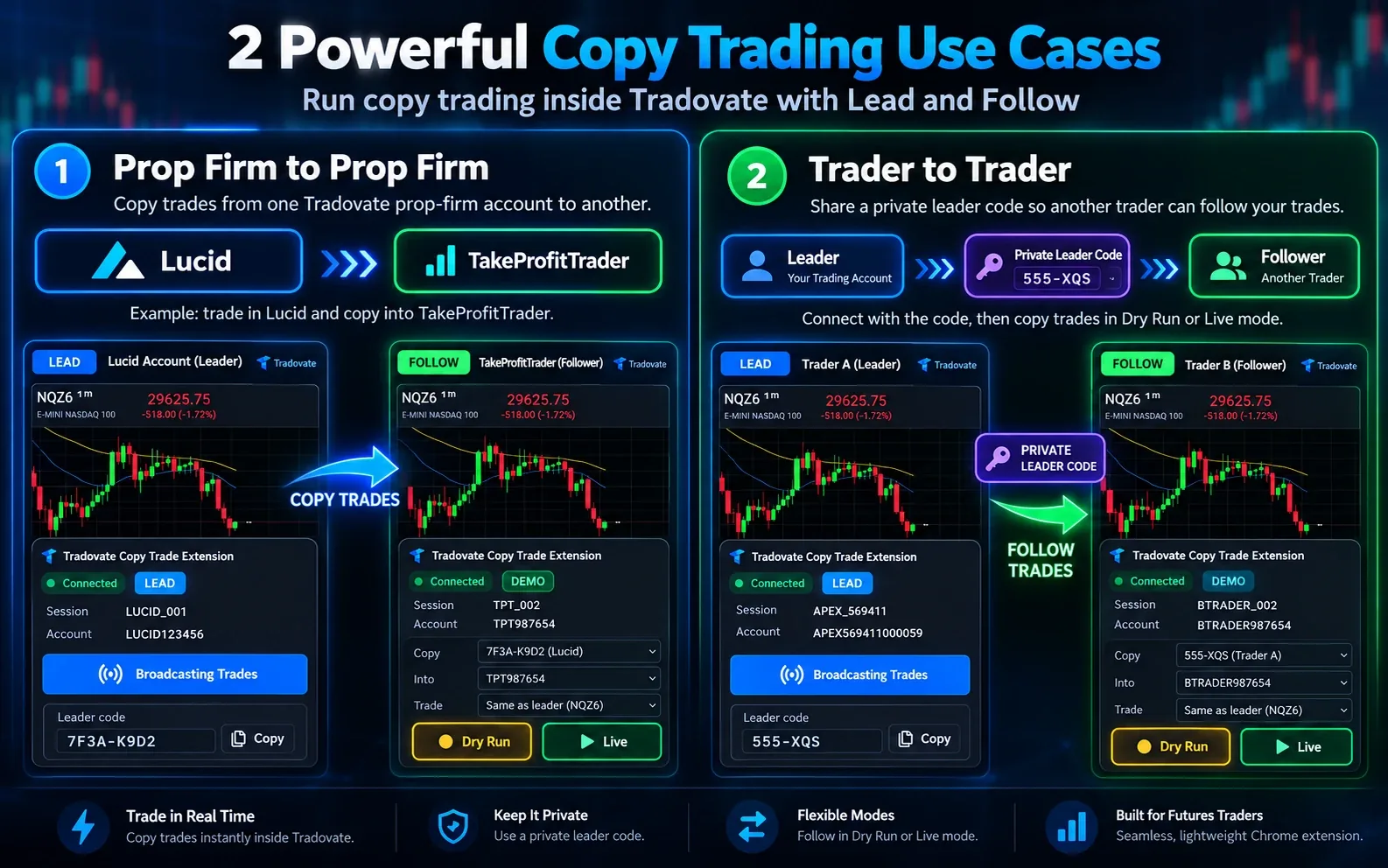
Why Tradovate group trading can't copy across prop firms
Tradovate has a built-in group trading feature, and many prop firms point you to it. It places one order on several accounts at once, but only across the accounts you can see inside the same Tradovate login.
Every prop firm gives you a separate Tradovate login. Your Lucid accounts live in one login, your Apex accounts in another, your Tradeify accounts in a third. Group trading in one login can't see the others, so it can't copy a trade from Lucid to Apex.
To copy between firms you need a copier that works across logins. Most are paid desktop or cloud apps with a monthly subscription. Copy Trade for Tradovate does it for free inside Chrome.
What you need
- Google Chrome on a desktop or laptop
- Two or more prop firm accounts that trade on Tradovate (for example Lucid Trading, Apex Trader Funding, Tradeify or MyFundedFutures)
- The free Copy Trade for Tradovate extension
Step-by-step setup
Install the extension
Add Copy Trade for Tradovate from the Chrome Web Store. It only runs on trader.tradovate.com.
Open each prop firm in its own tab
Log in to your first prop firm's Tradovate account in one Chrome tab and your second firm's account in another tab. The extension keeps separate settings for each login.
Set your main account to Lead
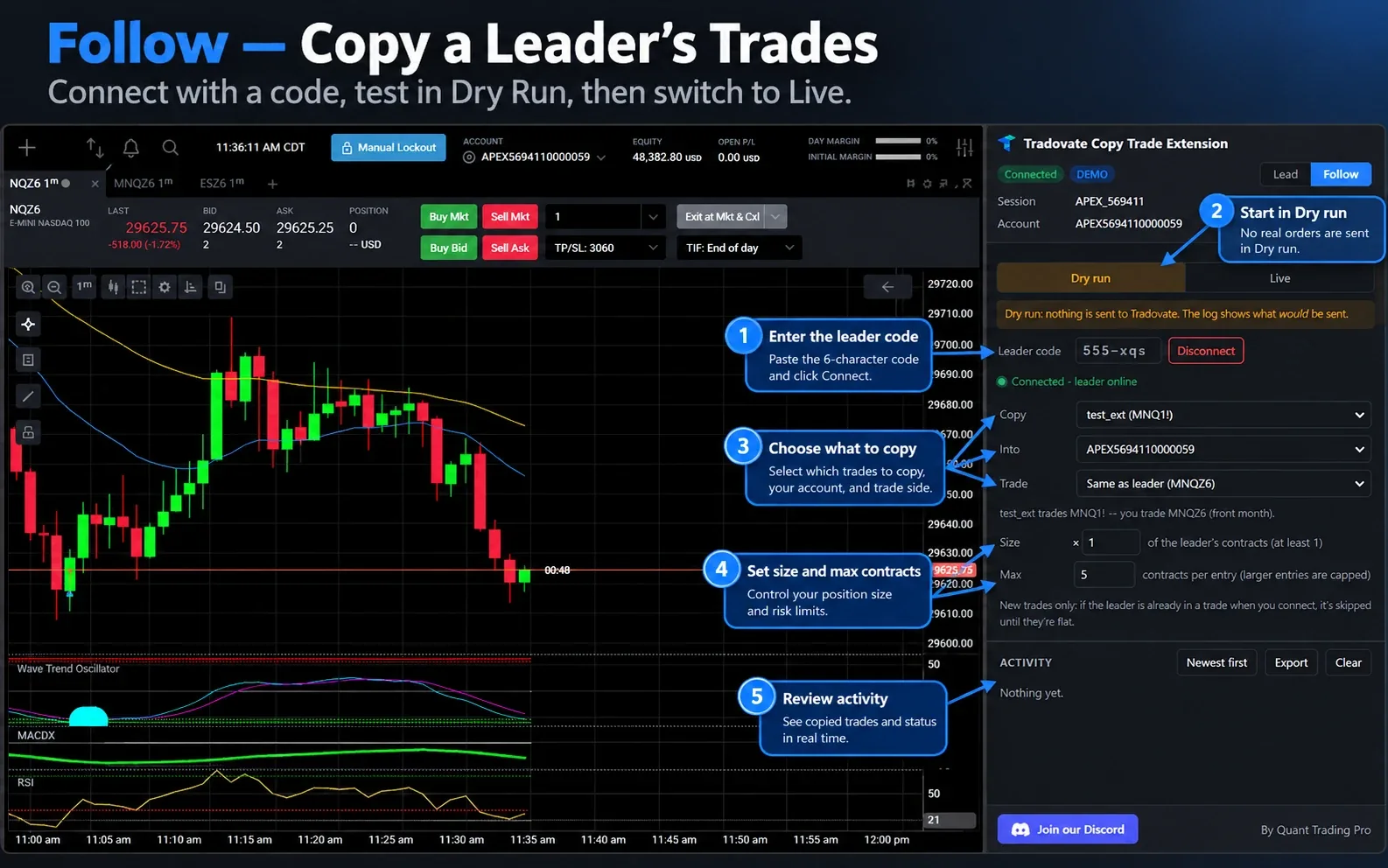
In the tab you'll trade from, open the side panel, choose Lead, pick the accounts to broadcast and copy your private leader code.
Set the other tabs to Follow
In each other tab choose Follow, paste the leader code, then pick which leader account to copy and which of your accounts receives the trades.
Size each follower for its firm's rules
Set the contract multiplier and a maximum contracts per entry. Prop firms have different drawdowns and contract limits, so a 50K account at one firm may need a smaller size than a 100K account at another.
Test in Dry Run, then go Live
Dry Run shows the orders that would be sent without sending them. Place a trade in the lead tab and check the follower's activity log. When it looks right, switch the follower to Live.
What gets copied
- Market, limit and stop entries
- Stop-loss and take-profit brackets, including Tradovate ATM templates
- Stop and target moves
- Order cancellations, exits and flatten
You can also trade a different contract on the follower, for example the leader trades MNQ and the follower trades NQ. Stops and targets are copied when both contracts are in the same market.
Tips to avoid breaking prop firm rules
- Never copy in opposite directions. Every firm bans hedging, meaning long on one account and short on another in the same or a correlated product.
- Only copy between your own accounts. Most firms ban copying another person's trades, even if the copier supports it.
- Check whether your firm limits which copiers you can use. Some firms only allow copiers from an approved list. See our prop firm copy trading rules comparison.
- Watch news rules. A trade that is fine at one firm can break another firm's news rule.
- Keep Tradovate tabs awake. Add trader.tradovate.com to "Always keep these sites active" in Chrome's performance settings.
Limitations to know
- Live copying currently works on Tradovate demo sessions, which include simulation and most prop firm evaluation accounts. Dry Run works everywhere.
- Leader trades must be placed in the Tradovate web trader tab. Orders from TradingView or the Tradovate mobile app aren't copied yet.
- The leader and follower accounts must be in different Tradovate logins.
- Fills and prices can differ slightly between accounts.
FAQ
Can Tradovate group trading copy trades between prop firms?
No. Group trading works across accounts inside one Tradovate login, and each prop firm gives you its own login. You need a copier that works across logins.
Is there a free way to copy trades between prop firms on Tradovate?
Yes. Copy Trade for Tradovate is a free Chrome extension. One tab leads, the others follow.
Do prop firms allow copying trades between my own accounts?
Most do, with conditions. Some only allow approved copiers, some ban automation, and all ban hedging across accounts. Compare them in our copy trading rules guide.
Copy trades across prop firms for free
No subscription, no extra platform. Start in Dry Run today.